
This feature allows applicants at eligible West Hollywood properties to indicate that they have a Reusable Tenant Screening Report (RTSR) and use the property’s configured RTSR screening charge. This article explains how to enable the feature, what applicants will see, and how site teams should review submitted reports.
Account/Property Setting - Company Actions
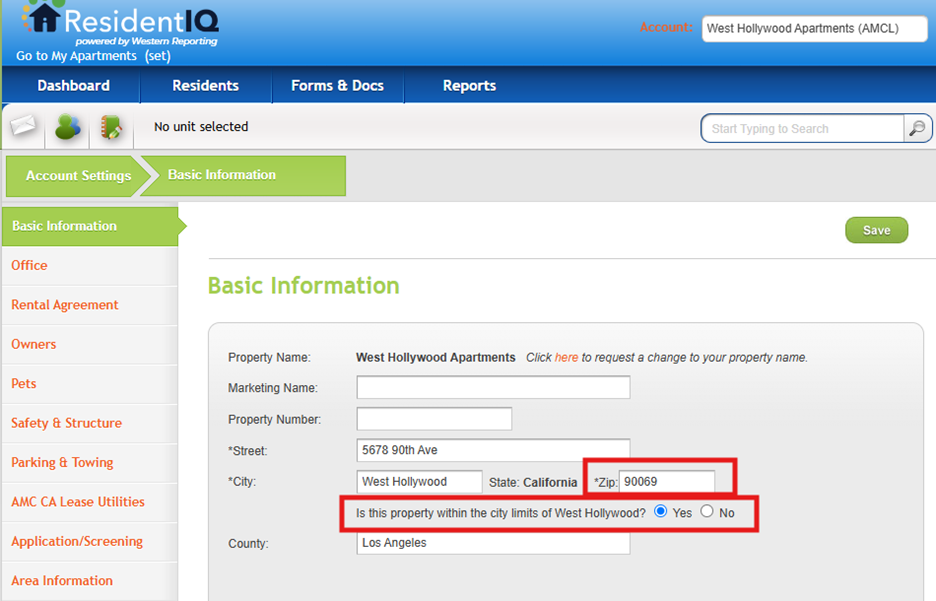
Confirm the Property Is in West Hollywood
- Go to Account/Property Settings
- Select Basic Information
- Confirm that the property ZIP code is correct
- For ZIP codes 90038, 90046, 90048, and 90069, locate the West Hollywood question under Special Cities
- Select Yes- only when the property is physically located within the City of West Hollywood. This activates the West Hollywood RTSR workflow
- Select No- when the property is not within West Hollywood city limits. The standard OLA and screening-charge behavior will continue
Important: A listed ZIP code does not activate RTSR by itself. The city confirmation must be answered Yes. If you do not have access to modify this area of the program, please reach out to your Company Admin.
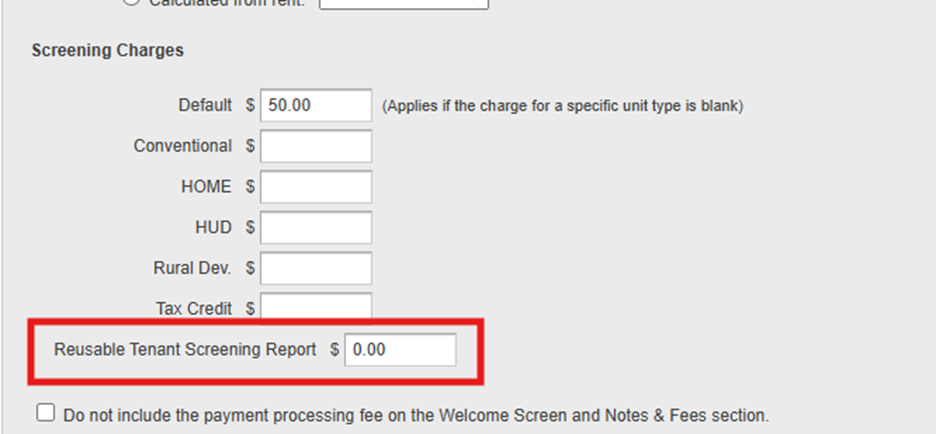
Confirm the RTSR Screening Charge is Added
- Go to Account Settings
- Select Application/Screening
- Update the screening charge for Reusable Tenant Screening Report
- Verify the configured amount. It defaults to $0.00.
- Confirm that the property’s standard screening charge is also accurate. Applicants who do not select RTSR continue to use the standard charge.
- Select Save
Online Application Workflow - Applicant's View
Where the RTSR Section Appears in the Online Application
For a property confirmed in West Hollywood, OLA automatically displays a Reusable Tenant Screening Report section. It appears in the Miscellaneous navigation tab. If the template does not have a Miscellaneous tab, OLA adds a separate RTSR tab before the signing page.
What the Applicant Must Do
- Select I have a reusable tenant screening report.
- Enter instructions explaining how the property can access the report. The instructions should include the consumer reporting agency name, website, and any information the property needs to retrieve the report.
- Select the required attestation confirming that there has not been a material change in the report information, including the applicant’s name, address, bankruptcy status, criminal history, or eviction history, since the report was generated.
- Continue through the remaining application steps.
How the Applicant’s Fee Is Determined
Important - Each applicant’s fee is based on that applicant’s own RTSR selection.
- RTSR selected: The application uses the property’s West Hollywood RTSR screening charge. The charge defaults to $0.00; when it is $0.00, the payment step is skipped.
- RTSR not selected: The application uses the property’s standard screening charge.
Managing Applicants in Program
Review an RTSR Submission in the Applicant Details Panel
- Open the applicant record in program and review the applicant detail panel.
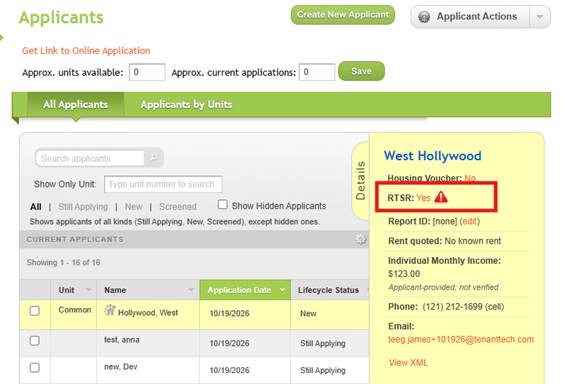
- Locate the RTSR Alert
- Hover text displays “Reusable Tenant Screening Report.” When RTSR is Yes, the panel shows Yes with an alert icon.
- Open the RTSR value to review the access instructions entered by the applicant. Use those instructions to access the report through the identified consumer reporting agency.
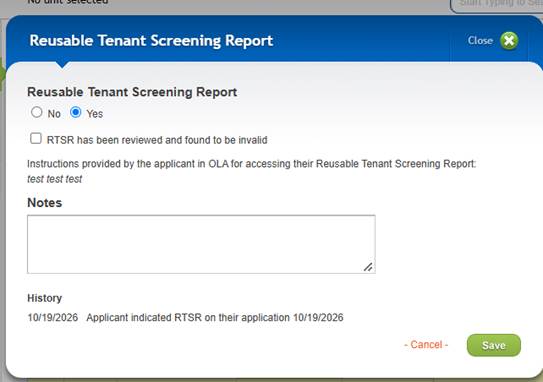
- If the application collected a file, use the available download option. If no file was provided, continue with the applicant’s access instructions.
- Review whether the report meets the applicable requirements. The system does not automatically validate the report age or contents.
- Add a note that clearly documents the review outcome and any follow-up needed.
- Review the history for the applicant’s original RTSR indication and submission date, RTSR value changes, note edits, and the source of manager updates.
Important: Managers can set RTSR to Yes or No and document their review. The system does not automatically validate the report’s age or contents. Marking a submitted RTSR as invalid does not refund or recalculate a fee that has already been charged.