
TenantTech does not provide screening services directly. If there are any screening fees, they will be billed by the screening provider you select.
To choose a screening provider, go to Account Settings then Application/Screening. From the drop-down menu, select the screening company of your choosing. Providers that are integrated with TenantTech are marked with an asterisk (*) in the drop-down list.
The companies listed below have an interface with TenantTech.
*Note: Selecting a provider in TenantTech does not enroll you in services with that company. After you make your selection, contact the provider directly to complete any additional steps needed to set up your account.
- Apartment Association of Orange County
- Background Investigations
- Bemrose Consulting
- Contemporary Information Corp. CIC
- Insight Reporting LLC
- Pacific Screening Inc
- REACS
- Tenant Evaluation System Inc
- TrueSource Screening LLC
- Western Reporting (*Note: Western Reporting provides additional menu functions via their integration with TenantTech. See below for details.)
- WONS
- Rental Screening LLC
If your screening provider is integrated with TenantTech, you can send applicants to screening directly from TenantTech.
After your integrated screening company setup is complete, the Send to Screening option will appear in the applicant details panel, allowing users to send applicants to screening from the Applicant Details menu.
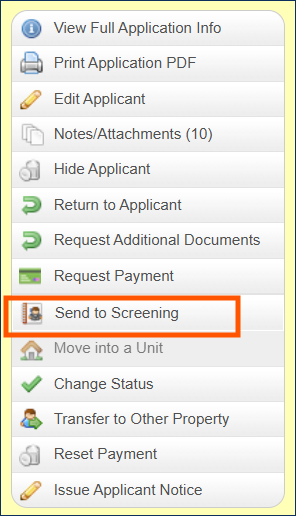
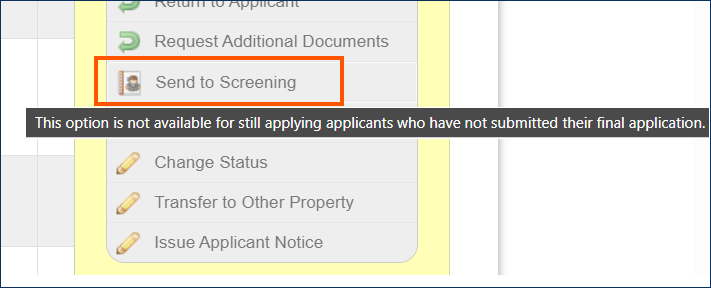
If the Send to Screening option is grayed out, that indicates that either:
- The integration is not fully complete, or
- The applicant is Still Applying.
Tip: When a menu option is grayed out, hover your cursor over the button to see a message explaining what action is needed to enable that function.
Western Reporting Features:
When working with applicant groups (applicants that have been linked together as a group in TenantTech), users will see a group management menu in addition to the standard menu found in the Applicant Details Panel.
For more information on linking applicants as a group, please see Linking Applicants - Creating Applicant Groups.
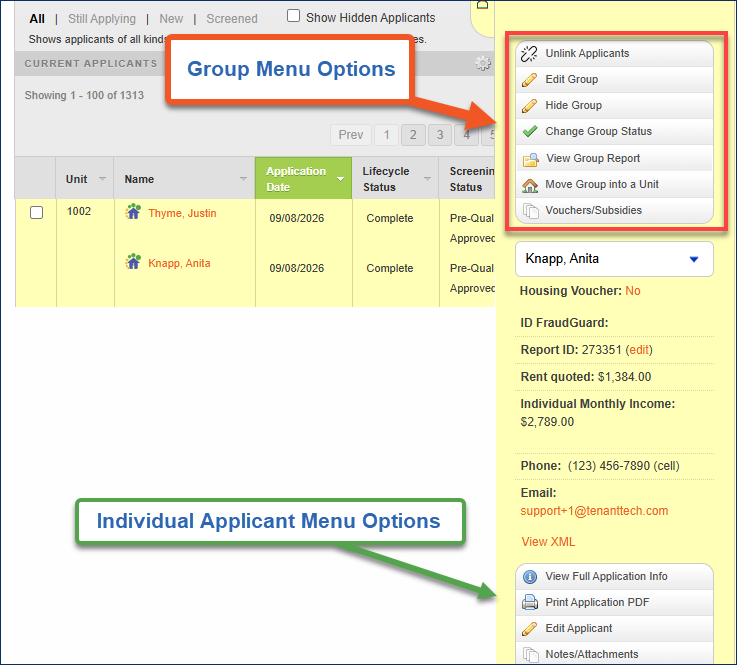
Properties utilizing the integrated screening service through Western Reporting will see additional group menu options to Send Group to Screening and View Group Report.
- Send Group to Screening - Allows users to send the applicants to screening as a group rather than individually selecting each applicant to send to screening. For more information, see How to send an Applicant to Screening from TenantTech.
- View Group Report - Allows users to view a screening report for the group combined rather than an individual applicant within the group. For more information, see How to View a Screening Report in TenantTech.
*Note: These group menu options are only available for properties utilizing Western Reporting’s applicant screening services.